
Search Knowledge Base by Keyword
Update Contact Info in Point
Background
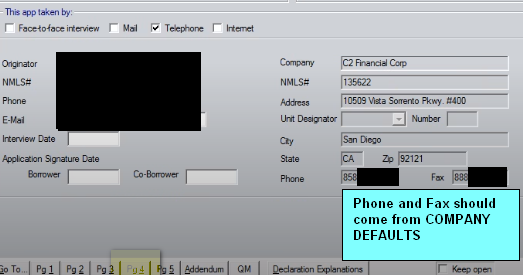
The Loan Originator’s Phone and Fax Number must be updated inside of Point. This information is displayed on the 1003 loan application and on any VERIFICATION FORM such as Verification of Employment.
Please follow the steps below to modify the Phone and Fax number on the Company Information screen. The Phone number should reflect the best number to reach you, the LO. The Fax number is optional but strongly suggested. If you do not have a fax line, sign up for a digital fax at efax.com
How to make the change.
- Open the Work In Progress (WIP) Folder
- Click Utilities –>Company Defaults–>Company Information (Fig 1)
- Update the Phone # and FAX # Fields to reflect your Contact Information (Fig 2)
- Validate the Suite Number for C2 is #400
- Do not make changes to any of the other fields
- Click OK to Save
- Repeat on any additional Data Folder that you start a loan from as this information is Data Folder specific
That information will now be reflected on Pg. 4 of the 1003 Loan Application. (Fig 3)
Fig 1
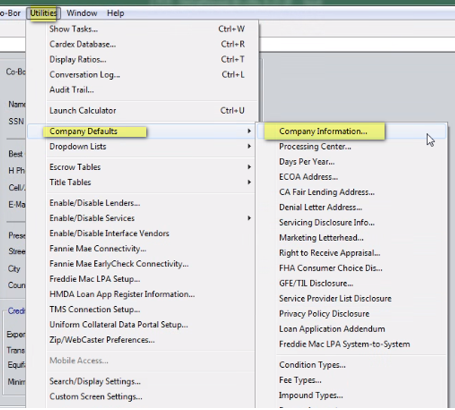
Fig 2
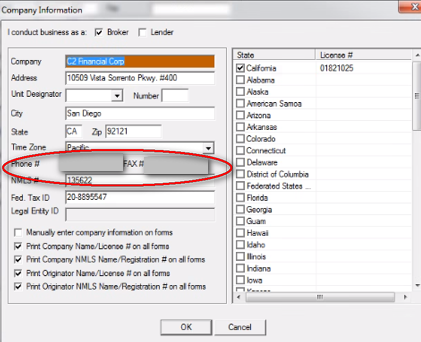
Fig 3
Was this post helpful?
Let us know if you liked the post. That’s the only way we can improve.