
Search Knowledge Base by Keyword
Point Connectivity Troubleshooting
Each time the Point Application opens it will connect over the internet to the Point Central Database hosted in the Cloud. If there are internet connectivity issues between a PC and the Data Center, Point may provide the following error.
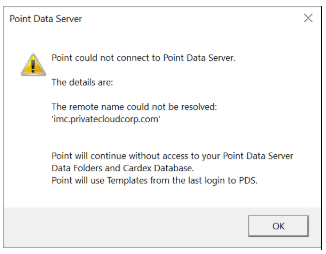
To troubleshoot this error Calyx has provided a website to test connectivity from a PC to Point Central.
Simply Click this URL: https://imc.privatecloudcorp.com:8888/service/
And validate it returns the following information, although your IP will be different

If nothing is returned when clicking the link then there is an issue with your internet connection.
If you receive the reply listed above but Point still will not open, then the issue is with your PC.
We suggest the following:
- Reboot
- Open and Test Point
- Apply all Windows Updates
- Reboot
- Apply Windows Updates again the screen states “No Updates Available”
- Reboot
- Open and Test Point
- Remove and Reinstall Point
Was this post helpful?
Let us know if you liked the post. That’s the only way we can improve.