
Search Knowledge Base by Keyword
HDMA on Loan Pg. 4 is crossed out when printing
Issue
When printing the 1003 , the section: Information For Gov’t Monitoring Purposes has an “X” through it on Pg. 4 of the loan application.
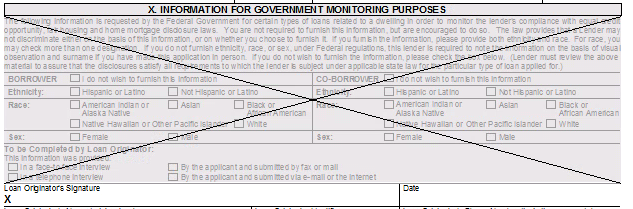
When the Loan Application Addendum is Enabled in Point, the Home Mortgage Disclosure Act (HDMA) printed on Page 4 of the 1003 under the section “Information For Government Monitoring Purposes” will have an “X” through it, as that information should be available in the Addendum.
In the event a Loan Addendum will not be added, it will be necessary to toggle the setting to remove the “X” and ensure the HDMA is printed. This change can be made via the Utilities Menu.
Solution
- Open a Loan File
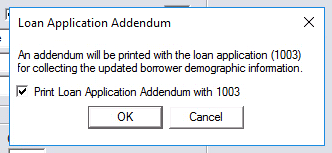
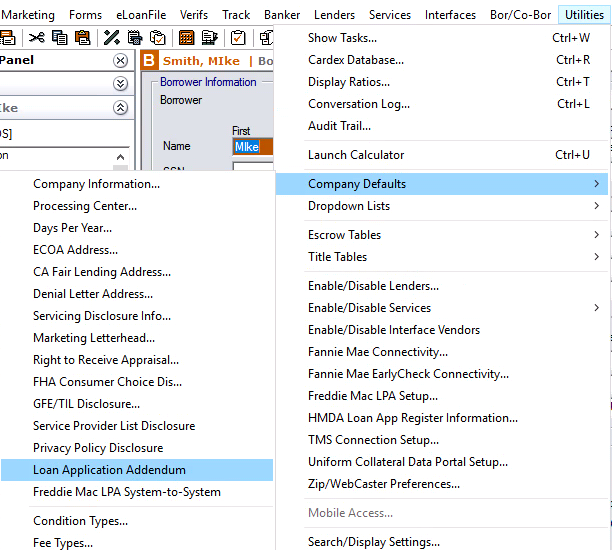
- Utilities–> Company Defaults–> Loan Application Addendum
- Toggle the checkbox Print Loan Application Addendum with 1003
- Press OK
- Verify the Information For Gov’t Monitoring Purposes section no longer has an “X”
Please be aware with this setting unchecked, the loan Packet will no longer contain an Addendum. Perform the same steps to reverse the change.
Information on Printing the Addendum is available on the Calyx Support Site.
*This change will need to be made on each Data Folder where loans are processed. For this reason it is recommended that each Loan Originator pick one Data Folder to operate out of.