
Search Knowledge Base by Keyword
Add Fannie Mae Desktop Originator Credentials into Point
C2 Loan Originators may contact Fannie Mae to register for Desktop Originator or Desktop Underwriter Credentials. Once obtained they may be entered into Point to allow Point to connect. Additional links to Fannie Mae are located at the end of this post.
Entering Credentials
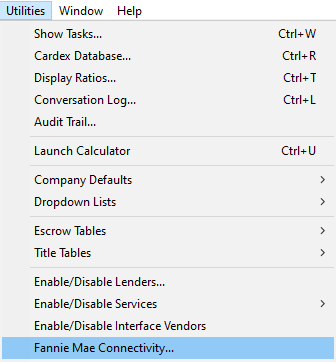
- Click Utilities–> Fannie Mae Connectivity…..
- Select Desktop Originator or Underwriter depending on the Credentials you have registered for.
- Leave the three check boxes blank
- Enter the User ID
- Enter the Password – Info on PW resets is listed below
- Leave the Institution ID blank
- Click the OK button

Fannie Mae Links
- Desktop Underwriter & Desktop Originator – https://singlefamily.fanniemae.com/applications-technology/desktop-underwriter-desktop-originator
- Password Reset – https://singlefamily.fanniemae.com/applications-technology/technology-manager
- Help + Training – https://singlefamily.fanniemae.com/learning-center/applications/technology-manager-learning-center
Please Note: If you receive a credit error when running DO/DU we strongly suggest that you logon to the Advantage Credit Website, via Chrome and then try to run DO/DU again.
Was this post helpful?
Let us know if you liked the post. That’s the only way we can improve.