
Search Knowledge Base by Keyword
Point Interfaces
Interfaces allow 3rd party Tools and Sites to integrate with Point eliminating the need to leave the applications to access a website.
Point Interfaces are discussed in detail beginning on page 331 of the Point User guide 10.3 SP2. The following is a excerpt.
The following types of interfaces are available:
Lenders:The Lenders interface provides access to participating wholesale lenders through Point. You can access various lender-specific loan forms on their website and submit them directly to the lender. Enabled lenders are accessible from the Lenders menu.
Services: The Services interface provides access to participating mortgage service providers through Point. Services such as requesting credit reports, title documents, closing documents, and insurance quotations are available from the Services menu. Enabled providers are selected from the request screen for the service being ordered.
Interfaces: The Interfaces function provides access to participating vendors that have integrated their software with Point. Vendors available through the interfaces function include Fannie Mae Desktop Originator®, Desktop Underwriter®, and EasyCheck™, Freddie Mac Loan Product Advisor® & WebCaster.
Steps to enable a 3rd party Interface
In this example we will integrate the Loan Sifter Interface.
- Visit the 3rd party Site to obtain a Username and Password.
- https://www.loansifter.com
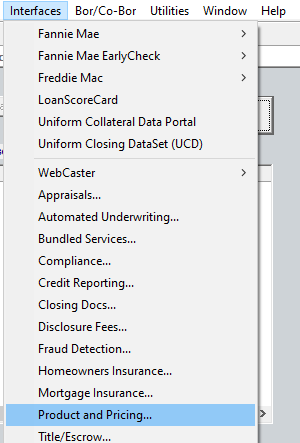
- Click Interfaces–> Product & Pricing….
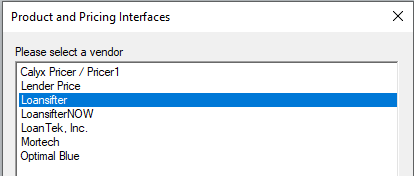
- From the list select Loansifter & click Ok
- Click the button to Launch Loansifter.com

- Enter the Username and Password for Loansifter.com

- Click the Login Button
Troubleshooting
Since most Integrations consist of a Username and Password it is suggested the first step in troubleshooting authentication errors is to visit the website of the Integration. Using this example if Point could no longer connect to Loansifter, it would be suggested to visit the Loansifter.com to reset the password: https://www.loansifter.com/signin.aspx?type=forgot