
Search Knowledge Base by Keyword
Setup a Credit Service
In order to fully utilize Point Central to its full potential, Calyx has provided Integrations to 3rd Party apps and tools so you need not leave the Point Application. It is suggested that one of the first Integrations to configure is a Credit Service.
Additional information on other Integrations is available here.
Most users of the C2C3 Platform use Advantage Credit Inc. as their credit provider. During the setup of a Credit account a Credit Card is associated to allow the the service to bill you for the Credit Report.
Other Credit Providers include:
- Certified Credit Reporting Inc.
- CIS
- Credit Plus, Inc.
- Funding Suite
- MeridianLink, Inc.
Establishing a Credit Account with Advantage
- Select the service provider to use. If choosing Advantage Credit Inc. Please review the requirements set forth on their website: https://www.advcredit.com/accounts/
- Click to Apply
Entering Credit Account information into Point
- Locate your Advantage Credit Inc. Credentials
- Logon to Point and open your WIP Folder
- Click Interfaces –> Credit Reporting
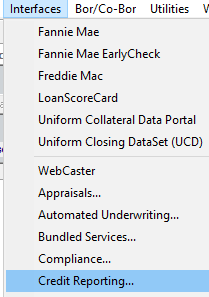
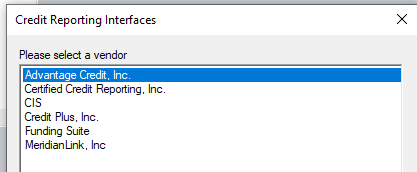
- Select Advantage Credit Inc. and press OK
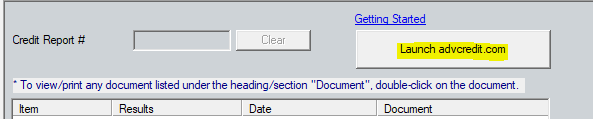
- Click the Button to Launch advcredit.com
- Enter the Username and Password provided by Advantage
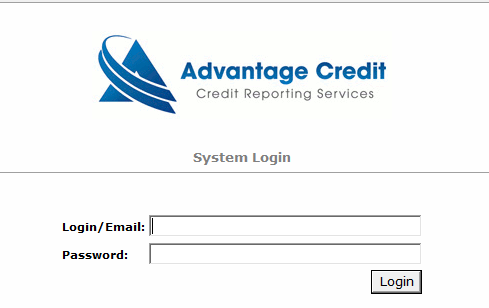
- Click the Login Button
Credentials will be saved to Point and available to use from within the Application.
Was this post helpful?
Let us know if you liked the post. That’s the only way we can improve.