Search Knowledge Base by Keyword
Add/Modify Freddie Mac LPA System-to-System Credentials
In January of 2019 Freddie Mac converted to utilizing System-to-System for all digital communication. For security reasons, every 120 days the System-wide password is changed and this change must be updated inside of Point Central.
Users of Point Central may email the C2C3 Cloud Desktop Support Desk to obtain current credentials as they are not published in the article for security reasons.
System-to-System Credentials
The steps below provide insight as to how to modify this information.
- Logon to Point
- Select the Data folder you use to Create loans in – could be the WIP folder
- Utilities –> Company Default –> Freddie Mac LPA System to System
- Enter \ Verify the credentials for:
- User id
- Company Level Authentication Password
- LP Password
- Generic Seller Servicer #
- TPO
- Click OK
- Close Point & re-open
Once complete please try to connect to LPA. If an error occurs and you copy/pasted the information, please re-enter it by typing each individual character. Then close Point and re-open to test. If an error still occurs please respond back to this email to engage the Help Desk and we will assist.

Confirm the following is entered. Passwords my be obtained from C2 Financial.
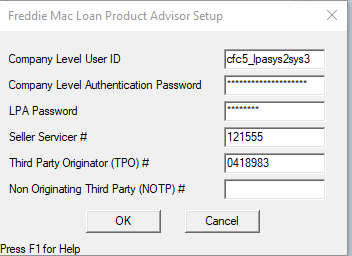
Loan Product Advisor LPA Credentials
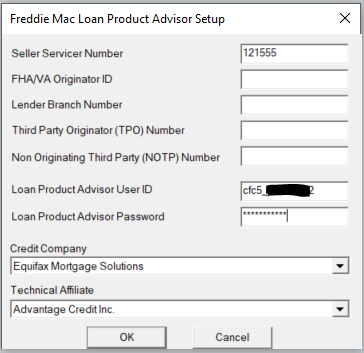
Loan Originators that have an Individual LAP User ID and Password may add them as well as set the Credit and Technical Affiliate Defaults by clicking Utilities–> Freddie Mac LPA Setup. Please Note: once these credentials are set they do not need to change when the Company Level Authentication Password does.
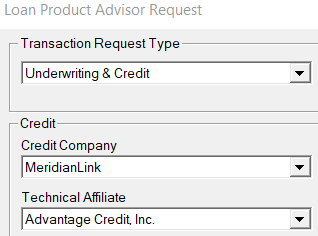
When using Advantage Credit, Select MeridianLink and then Advantage Credit