
Search Knowledge Base by Keyword
Run LPA against a Loan File
Prerequisites
- C2’s Freddie Mac LPA System-to-System credentials. Point Central Users will find that the LPA information is pre-populated inside of Point. However the password changes every 120 days and will need to be updated. Instructions to do so are available here.
- Liabilities on Page 3 of the 1003 must be “matched” to REO.
Prepare
- On Page 1 of the 1003 Loan Application, enter the Lender’s Last Name in the Lender Case No. Field.

- Click Services–> Freddie Mac –> Addendum.
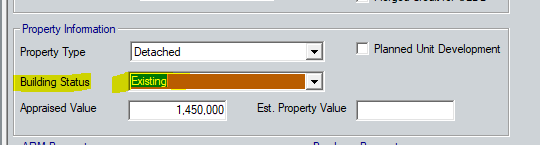
- Set the Building Status for the Property –> Existing.
- Save the Loan File.
Submit to LPA
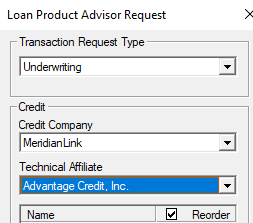
This example uses Equifax Mortgage Solutions & Advantage Credit Inc. If you run loans through a different Credit Affiliate, please select those settings.
- Click Services–> Freddie Mac –> LPA.
- Leave the first Drop down set to Credit & Underwriting.
- Select the Credit Company.
- Select the Technical Affiliate.
- DO NOT check the sub-boxes for reorder as shown in the example below.
- DO NOT enter anything for LPA Key, Loan ID or Check Status ID as those will be populated by Freddie Mac.
- Click Submit
- When LPA completes it will fill in the Loan ID and Status ID and a Completed window will appear.
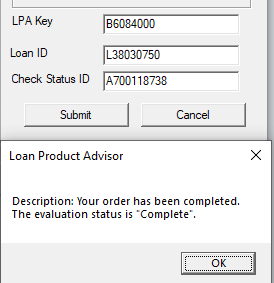
- Click OK.
- Save the Loan File.
- Next confirm the loan has been uploaded to Freddie.
- Logon to Freddie Mac website to validate the loan has been uploaded – https://las.freddiemac.com/lsp_prod/las-sec/pages/welcome
- or contact Freddie Mac at 800-373-3343
Was this post helpful?
Let us know if you liked the post. That’s the only way we can improve.