
Search Knowledge Base by Keyword
Security – Best Practices
As per Best Practice and to help meet Compliance requirements, we make the following recommendations to assist in securing client data.
- Set a passphrase for all User Accounts on a PC or Laptop.
- A passphrase should be longer than a password. Think more along the lines of a sentence. As an example; “mycatshangoutonthecouchin2020” or “B@seball is played in Summer”
- Use Multi-Factor Authentication or Windows Hello whenever possible.
- Do not use the same password for multiple web sites. Instead come up with a phase that you can change based upon the site. As an example: “ThisismyPOINTpassphrase!” or “Thi$ismyYAHOOpassphra$e” Then enter the name of the site to make the passphrase unique.
- Do not send passwords via email. Text or call someone when sharing.
- Secure internal Hard Drives using Microsoft Bit-locker Drive Encryption. Failure to use Drive Encryption will allow:
- User Account Passwords to be cracked using tools found on the Internet. When as passphrase is cracked the hacker will have access to the same data you do.
- The internal Hard Drive to be removed and connected to a different PC to have its data read/copied.
- Add a Password to any Loan File that will be saved as PDF and emailed.
- Use a Free Public DNS resolver that will provide better protections than your ISP.
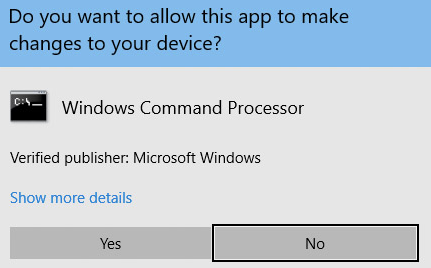
- Pay attention when Windows asks to make a change to the PC. When a similar prompt to that below appears, STOP and THINK before you click YES. When in doubt, click NO.
Was this post helpful?
Let us know if you liked the post. That’s the only way we can improve.